Delete Credentials
You can delete the credentials associated with an account, or a specific transaction. The transaction metadata and decision will not be deleted.
1. All Credentials Deletion
You can delete all credentials associated with an account or a specific transaction.
Ad-Hoc Deletion
Use the following APIs for deleting all credentials for transactions:
- Delete All Credentials for an Account API to delete all the credentials associated with the transaction.
- Delete All Credentials for a Transaction API to delete a specific credential part associated with the transaction.
Deletion via Jumio Portal
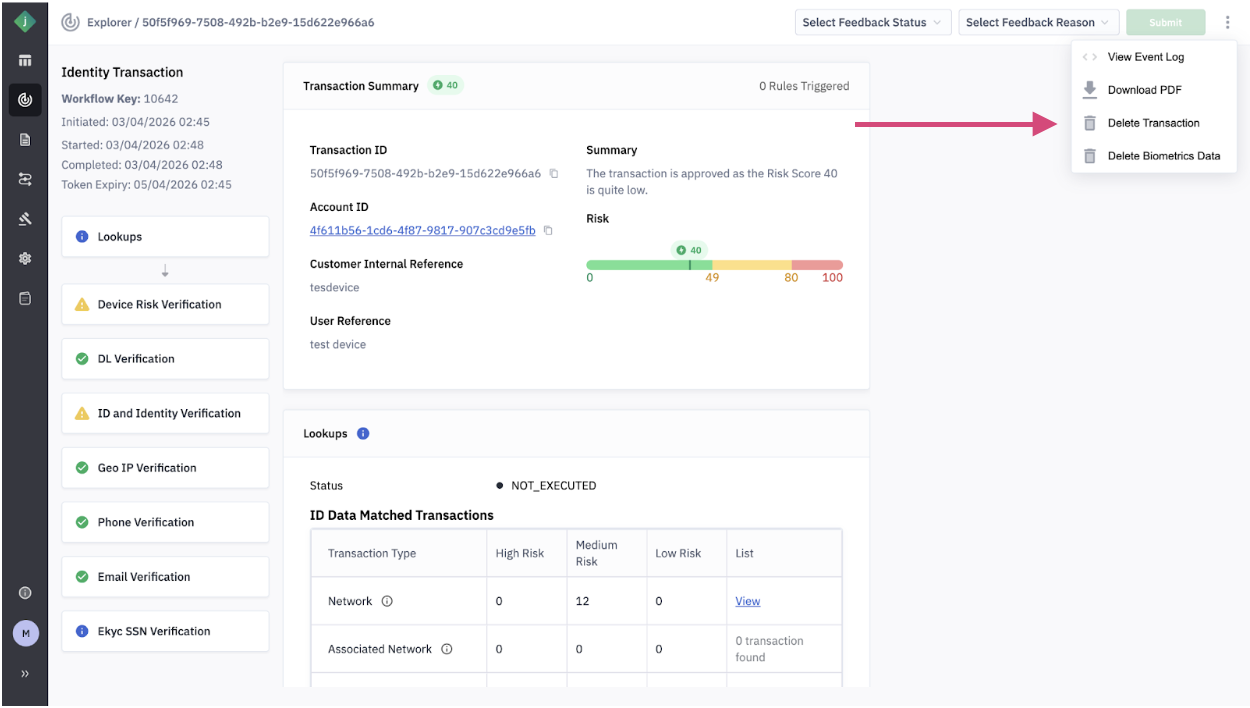
You can also delete all credentials for transactions through the Jumio Portal by navigating to the transaction details view.
2. Retention Period-Based Deletion
You can also contact Jumio Support to set a retention period for all transactions for your tenant for automatic deletion of all credentials. It is normally agreed as part of the account setup process.
How it Works
Retention policies are configured by contacting Jumio Support The retention period is typically agreed upon during account setup Deletion is triggered based on the last activity timestamp within an account (not per individual transaction)
Key Consideration
This ensures that products such as Authentication continue to function for users who remain active within the retention period.
3. Biometrics Credentials Only Deletion
Jumio supports deleting only biometric credentials within transactions, without affecting other data.
Ad-Hoc Deletion (via API)
Use the following APIs:
- Delete Only Biometrics for an Account API. Deletes biometric credentials for all transactions under an account
- Delete Only Biometrics for a Transaction API.
Deletes biometric credentials for a specific transaction
| What Gets Deleted | What Is Retained |
|---|---|
| Face vectors and embeddings | Original images (e.g., selfies or ID documents) |
| Stored biometric templates used for matching or authentication | Transaction metadata |
| Verification results | |
| Other non-biometric credentials |
Impact of Biometrics Deletion
Once biometric data is removed:
- Face matching and face lookup can no longer be performed for that transaction
- Authentication and liveness checks cannot reuse previously stored biometric data
- Deleted biometric data is not recreated, even if the transaction is accessed again
Deletion via Jumio Portal
You can also delete biometric credentials through the Jumio Portal by navigating to the transaction details view.
4. Retention Period-Based Biometrics Deletion
You can configure automatic deletion specifically for biometric data.
- Requires configuration through Jumio Support
- Applies to all transactions within a tenant
- Typically defined during account setup
- Retention and deletion policies for credentials containing PII are governed by Data Settings in the Jumio Portal
- Retention-based deletion uses the last activity time within an account, not individual transaction timestamps
- This ensures continued functionality for active users
Credential deletion is permanent and irreversible. Once deleted, the data cannot be recovered.